
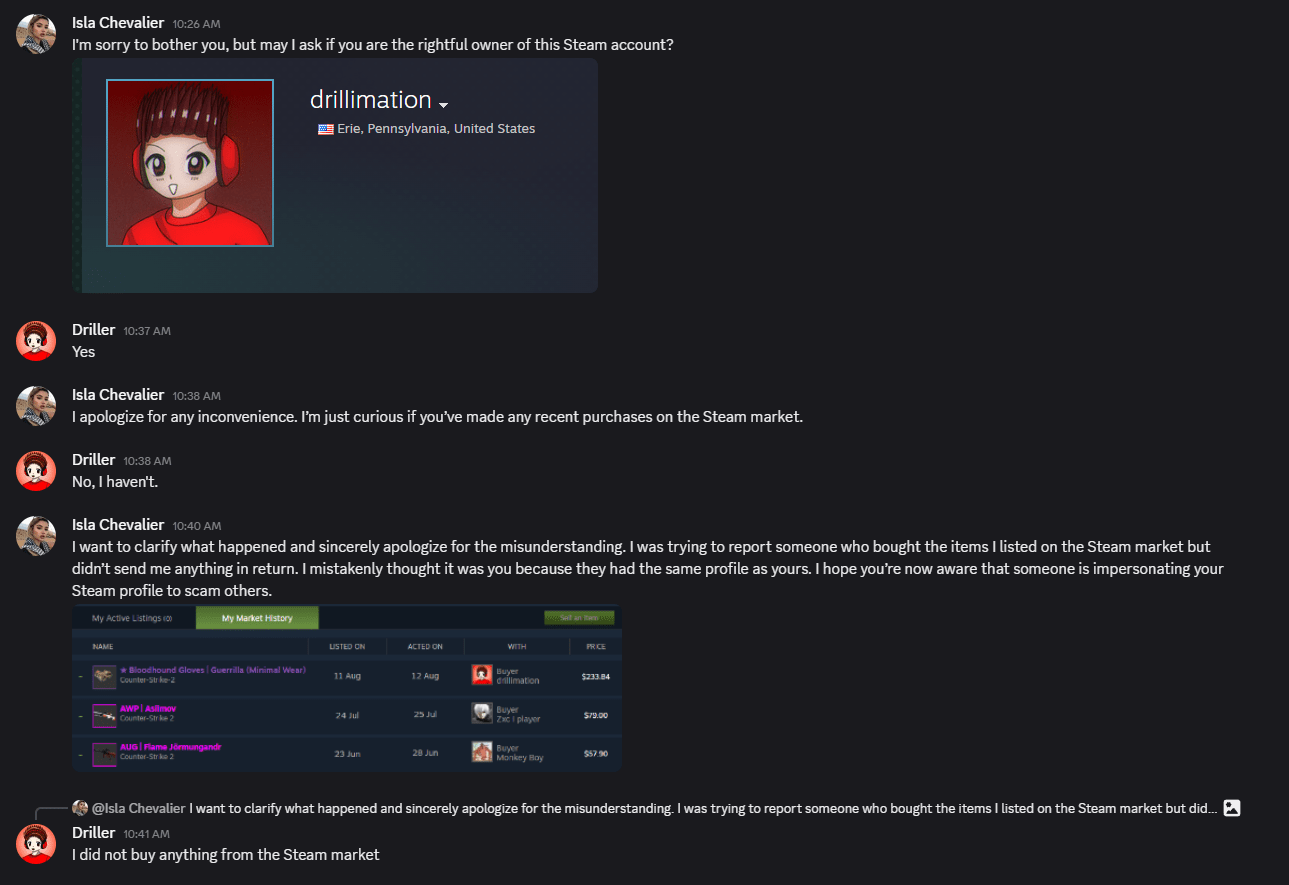
If you receive a direct message on Discord from a user claiming they “accidentally reported” your Steam account for fraud, take a step back—you are likely being targeted by a classic social engineering scam designed to hijack your Steam account and inventory.
How the Scam Unfolds
In now-deleted chat logs obtained from a recent incident, an attacker using the profile name Isla Chevalier reached out to Drillimation’s Prophet Driller.
- The Initial Hook: The scammer begins with a polite, casual message asking if the victim is the rightful owner of a specific Steam profile.
- The “Misunderstanding”: The scammer claims they were trying to report a fraudster who allegedly scammed them during a Steam Community Market transaction. They claim someone impersonating the victim bought their items (such as high-value Counter-Strike 2 skins like Bloodhound Gloves or AWP | Asiimov) without paying.
- The False Urgency and Fake Proof: Next comes the trap. The scammer sends fake screenshots showing a fabricated Steam Support ticket or market history. They claim they accidentally reported your account instead of the scammer’s. They warn that Steam Support is about to issue a 24-hour ban, full account suspension, or IP blacklist unless you take immediate action to clear your name.
- The Pivot to Fake Admins: When the victim checks their actual Steam account and sees no pending support notifications or warnings, the scammer claims Steam Support won’t notify you directly. Instead, they urge you to contact a fake “Steam Admin” or “Moderator” (often giving a Discord username or malicious link) to “resolve” the report.
If a victim follows through, the fake “admin” will typically demand sensitive account information, one-time login credentials, Steam Guard authentication codes, or even money under the guise of “verifying account ownership.” Once provided, the attacker swiftly takes over the account, changes the credentials, and loots any valuable items or wallet funds.
Key Red Flags to Watch For
- Claims of “Accidental Reporting”: Steam Support does not automatically ban or suspend accounts based solely on a single user report without independent verification. You will never be banned simply because someone “accidentally” reported you.
- Pressure to Move Outside Steam: Valve staff and official Steam Support representatives will never contact you through Discord, third-party messaging apps, or direct chat to resolve moderation tickets.
- Requests for Credentials or Verification Codes: Steam Support will never ask for your password, Steam Guard codes, or payment info to “cancel a report.”
- Fake Official Screenshots: Attackers frequently generate photoshopped Steam Support tickets featuring intimidating red banner warnings (“WARNING: This account has been flagged for suspected fraudulent activity”) to induce panic.
What to Do If You Are Targeted
- Do NOT Click Any Links or Add Suggested “Admins”: Ignore instructions to contact external support personnel.
- Check Official Steam Channels: Official warnings from Valve appear directly inside the official Steam client or via official emails from
steampowered.com. If there is no official alert in your account status, the message is a fake. - Report and Block: Use Steam’s built-in reporting tools to report the user for phishing/scamming, then block them immediately.
Update: Valve Responds
Following our initial report and an hour and a half after this article’s publication, Steam Support provided an official response regarding the “accidental report” scam tactic.
“Upon checking, I can see that there are no reports on your account. What happened to you is simply a scamming attempt. You can safely ignore anyone who claims to have mistakenly reported you – that will not get you banned,” a Steam Support representative confirmed.
Valve reiterated that Steam Support and Valve employees will never contact users on external platforms like Discord to verify items, discuss account details, or clear false reports.
For players looking to safeguard their accounts, Valve points to their official Scam: I Have Been Reported and Will Be Banned FAQ and General Scam FAQ for details on common social engineering tactics. Any suspicious activity occurring outside Steam should be reported directly to Discord’s support team.
Discover more from Drillimation Systems
Subscribe to get the latest posts sent to your email.


That’s so messed up. We’re like sitting ducks no matter where we go.
LikeLiked by 1 person