
Applies to:
- Touhou 1: The Highly Responsive to Prayers NES Demake
- Touhou 2: The Story of Eastern Wonderland NES Demake
- Touhou 3: The Phantasmagoria of Dimensional Dreams NES Demake
- Touhou 4: Lotus Land Story NES Demake
Some players have been asking how to toggle Windowed Mode for the Touhou Project NES Demakes. By default, the game will start in fullscreen mode. You can change this setting in the game’s options.sav file. I wrote this guide on how to do this. Don’t worry, it’s easy.
Step One
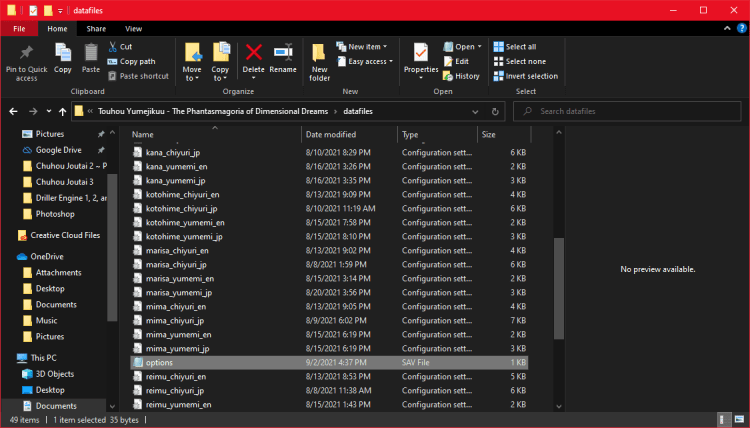
Go to the folder where you downloaded the game. Once there, scroll down until you see the “options.sav” file.
Step Two

Open the “options.sav” file, and in “fullscreen”, change the option to “0” (the actual number, not an “O”, and do not spell it out). Remember to save the file.
Step Three
Run the game. If you can see the game appear in a window, you are done. If you don’t, repeat the steps.
Discover more from Drillimation Systems
Subscribe to get the latest posts sent to your email.
 Drillimation Systems